Process and Change
What the Toyota Production System Taught Me About Building Better Business Systems
Five ideas from Toyota that decide whether a new system in a trades or construction business gets used or gets worked around: go and see, cut waste, don't overload the field, make problems easy to raise, and close the loop.
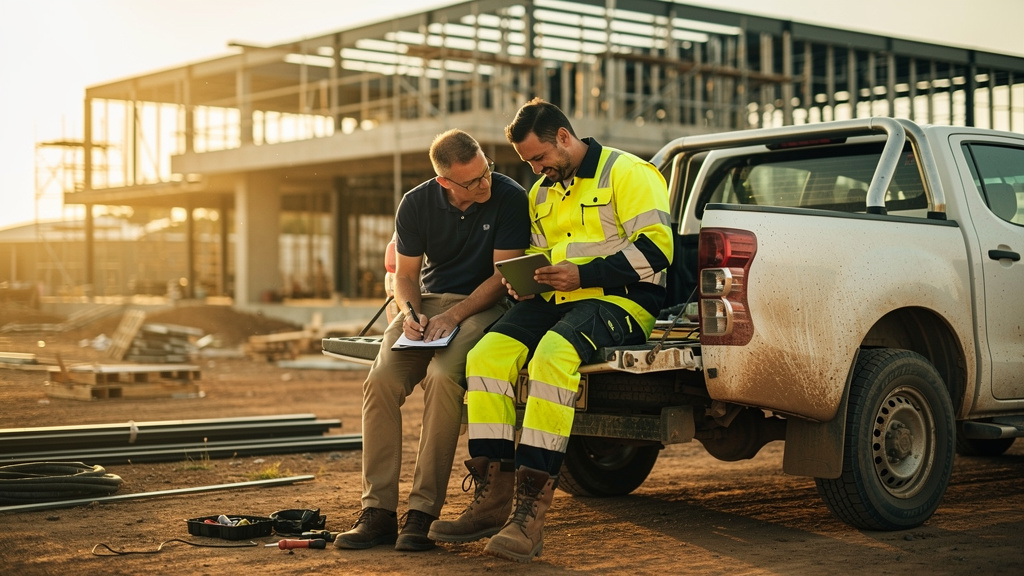
The best systems for trades and construction businesses start with the people doing the work.
A car manufacturer has taught me a lot about building business systems.
That might sound like an odd place to start for someone who spends his days inside plumbing, electrical and construction businesses, fixing processes and building the software underneath them. But some of the most useful principles I work by come from Toyota: how it runs production, how it keeps improving, and how it treats the people doing the work.
I'm not going to try to turn a plumbing business into a Toyota factory. A trades business has different jobs every day, different sites, different crews and customers changing their minds. A production line doesn't.
What I'm after is simpler than that. There are a handful of Toyota's ideas that, used well, make the difference between a system people put up with and one that actually works. Often they decide whether it works at all.
1. Genchi Genbutsu: go to where the work happens
Genchi Genbutsu is usually translated as "go and see for yourself". If you want to understand how something works, go to where it's done and watch it.
It's a simple idea and it's the one I see skipped the most.
When I work with a trades or construction business on a process or a piece of software, there are three views I need to understand. Take a timesheet system as the example.
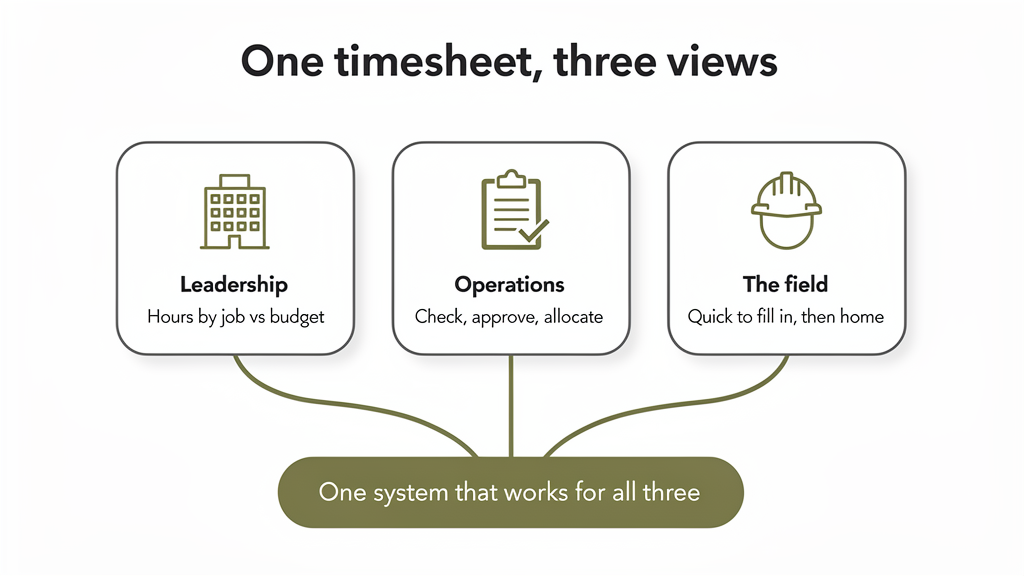
Leadership: what does the business need? At the top it's about outcomes. How many hours went into each job, how labour costs compare with the budget, whether people are being put on the right work. All reasonable.
Operations: how does the business need to run? One level down, it's about how information moves. Who checks the timesheets? Who approves them? How do hours get allocated to jobs, and what happens when someone moves between two sites in a day? Also reasonable.
The field: how does the person actually do the work? Then there's the person filling it in. The tradie who's just finished a long day on site and wants to log their hours and go home. The supervisor doing an end-of-day report. They don't care much about the monthly management report or how the numbers end up in Xero. They care whether it works, whether it's quick, whether the questions make sense, and how much of their evening it's going to take.
None of those three views is wrong, and they're all needed. But none of them on its own tells you what the system has to do.
Sit over someone's shoulder
Some of my best results have come from simply sitting with the people who'll use what I'm building. Sitting next to someone while they do their end-of-day report. Asking them to show me what they do now, rather than tell me how they think it works. Going out to site and watching the process in the real conditions.
You learn a lot that way. You find the steps people have added to get around the current system. You see the bits that are harder than they need to be. You work out why someone skips a field, puts things in the wrong place, or keeps notes on their phone and types it all in later. You see the interruptions and the practical stuff nobody mentions in a meeting room.
And you find improvements nobody knew to ask for.
A process can look perfectly logical on a whiteboard and be painful on site.
It builds trust, too
There's a second payoff that matters just as much. When you sit with someone and listen to how they do their job, you're bringing them into the change. It tells them their experience counts, and that this isn't something management has bought and they're expected to swallow. They're helping shape it.
That's where buy-in starts, usually well before the software is ready.
It's also the moment to explain the bigger picture: why the business needs this information, what problem we're solving, how it'll make things better. Not every worker needs to become an expert in job profitability. But knowing the reason behind a change gives them context, and context changes both how willing they are to take part and the calls they make when they're using it.
A good consultant isn't just collecting requirements from three levels of the business. They're translating between them, and getting everyone pointed at the same outcome.
2. Muda: don't automate waste, get rid of it
Muda means waste: anything that uses time or money without adding value.
This is one of the first things I look for when I'm working on a business's existing processes. When someone comes in to improve systems, the temptation is to take what's there and make it digital. Turn this spreadsheet into a form. Turn that paper report into an app. Move data from one system to another automatically.
Those might be improvements. They can also miss the bigger win, because the answer usually isn't the software. It's the process, and the software is there to make the process work. Before we automate a process, we should be asking whether it needs to exist in its current form at all.
"That's how we've always done it"
Processes build up over time. Someone needs a report, so a spreadsheet gets made. Someone needs to check things before they go further, so an approval step gets added. A new system comes in but the old process stays, because people are comfortable with it.
Years later the business has a pile of forms, spreadsheets, reports, handovers and manual jobs, and nobody can quite say why every step is still there.
That's not usually stubbornness or bad management. Each of those steps solved a real problem at the time. The process works, it produces the numbers someone needs every month, and nobody has had a reason to question it.
Until someone comes along to redesign the system. At that point I think we're obliged to look past the request in front of us and ask:
- Why is this being entered, and who uses it?
- Where does it go, and what decision does it support?
- Does it already exist somewhere else?
- Is it still needed, or could we get the same result a simpler way?
Those questions are often worth more than the technology.
Double entry is waste
The most obvious example is double entry. One person types something into one system, and someone else types the same thing into another. At Impact, payroll used to take one person up to two days. It now takes about two hours.
But connecting the two systems isn't always the whole answer. Sometimes one of the systems, forms or in-between steps doesn't need to exist any more. Sometimes the business is collecting information nobody uses. Sometimes a whole workflow can be simpler because we're no longer stuck with how things were done ten years ago.
Some double checks are there for good reasons: safety, compliance, financial control. Those need to be understood, not ripped out. The point is that every step should be able to justify itself.
If the business is already spending time and money changing its systems, that's the time to cut out the work that doesn't need doing. Everyone wins. The business gets cleaner processes and lower overheads, and the people doing the admin spend less time on admin that shouldn't exist.
Every step should be able to justify itself.
3. Muri: efficiency shouldn't cost the worker
Muri means overburden, and it matters a lot in trades and construction. Something can look efficient from one seat and cause real problems in another.
Say we're improving management reporting. Leadership wants better visibility of job costs, labour, progress and productivity. Nothing wrong with that.
But it's easy to take the narrow view. Management needs this information, so the person in the field fills in some extra fields. Done.
Except it isn't. That worker might now be spending a lot more time on admin, filling in complicated forms at the end of an already long day, entering things that could have been captured automatically or pulled from somewhere else. Over time they start to resent the system that was meant to help the business.
What overburden costs you later
Overburden isn't just annoying. It hurts adoption.
A system that keeps making someone's job harder will get pushback, especially if they can't see the point. People put off their entries. They find shortcuts. They fill in the minimum to get past the form. The data gets worse, and now management, who wanted better information in the first place, is getting information it can't trust.
We haven't solved the problem. We've moved it.
That's why I think the consultant's job includes protecting the time of the people using the system. That doesn't mean management can't ask for better information, or that nobody should ever have to learn something new. It means finding a way to get the business outcome without loading unnecessary work onto the people doing the job. Sometimes that's fewer fields. Sometimes it's reusing information that's already there, or capturing it at a different point in the day. And sometimes it's asking whether the business needs that piece of information at all.
The aim is to improve the process as a whole, not to meet one person's reporting needs at the expense of someone else's working day.
Don't fix management's reporting problem by giving the field a new one.
4. Andon: make it easy to say what's wrong
On a Toyota line, any worker can pull the Andon cord to flag a problem, call for help and, if needed, stop the line until it's fixed. It's part of a wider idea called Jidoka.
I'm not suggesting a construction company stops work every time someone finds a problem with an app. But the principle behind it is worth a lot. Everyone in the business should have permission, and an easy way, to raise a problem when something isn't working.
That sounds obvious, and yet businesses put barriers in the way of exactly that information all the time.
Don't put layers between the problem and the person who can fix it
When new software rolls out there's a natural urge to control how feedback gets to the consultant. Everything goes through one manager. Staff tell their supervisor, who passes it on to someone else.
I understand why. Nobody wants the consultant buried in messages or development constantly interrupted. But filtering it like that works against you. What comes from the field is gold, and I don't want it watered down, delayed or lost along the way.
I'd much rather set up a simple way for anyone to report a problem, and make sure those reports get sorted and prioritised properly on the way in.
Make feedback almost effortless
One of my favourite approaches is letting people record a quick video. Something doesn't work? Open the feedback button, point the phone at the screen, say what's happening, send it, and get back to work.
They shouldn't have to write an essay, know the technical words, or fight a ticketing system. It should be really easy to tell us when something's not right, or when they've spotted a better way. And we should be actively asking for it, not just putting up with complaints, because those observations are part of what we need to build a better system.
5. Kaizen: feedback only matters if something happens
Collecting feedback is half the job. Kaizen, continuous improvement, is about acting on it, over and over.
For business software, that means treating the system as something you keep refining as people use it. It doesn't mean changing everything all the time, and it definitely doesn't mean pushing surprise updates onto workers every day. It means a deliberate loop.
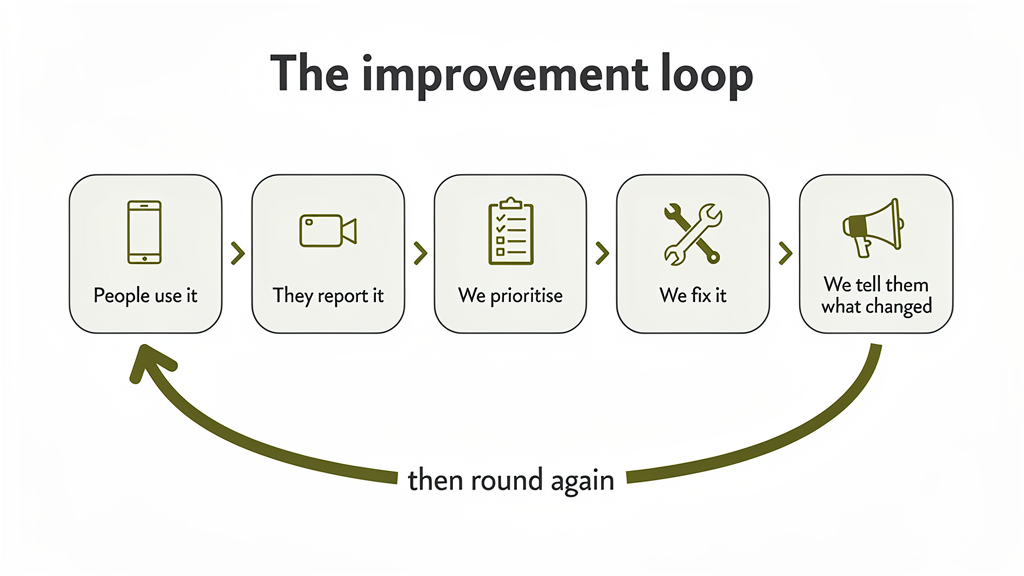
People use the system. They spot problems or improvements. We capture them, weigh them up, prioritise, make the changes and tell people what changed. Then we see how it lands and go again.
Build champions before the rollout
On a good project this starts well before we ask the whole business to use a new system. We've already spent time with people in the field, shown them early versions, listened and made changes, and let them test it.
By rollout, some of those people have become champions. They know the system, they know why it exists, and when their workmates have questions they can help. That makes a huge difference on a business-wide rollout. The change isn't something handed down from management any more; there are people on the tools who already understand it and back it.
When you've got it wrong
Not every rollout goes to plan. Sometimes a system went in before the right people were involved. Sometimes problems only show up once it reaches a wider group. And sometimes you're facing a crew that's properly fed up because the new system doesn't work the way they need it to.
That's when the feedback loop matters most. Bring those people in. Let them tell you what's wrong, listen without getting defensive, work out what needs fixing, and then fix it.
If a rollout is doing real damage, sometimes the right call is to roll it back to a small group and rebuild confidence before trying again. When rolling back isn't practical, you steady things up and show people they're being heard.
Visible change rebuilds confidence
The most effective thing you can do is tell people what's changing. Instead of quietly making five changes through the day and leaving them to discover the software behaves differently, tell them up front:
"Thanks for the feedback. We've found five issues and they'll be fixed tomorrow morning. Here's what's changing. Let us know if anything still isn't working."
Now they can see progress. They can see that what they reported is being dealt with, and they know what to expect. If we get into a steady rhythm of fixes, once or twice a week while things are being recovered, confidence comes back.
Telling people we care about their experience isn't enough. We have to show it.
6. The consultant's job is to bring it all together
There's a human side running through every one of these. Changing systems and processes isn't just a technical job, it's a change in how people work.
People have to learn new ways of doing things. They might worry they won't be able to use the new system, or that management is bringing it in to keep closer tabs on them. Something that used to be simple might feel more complicated. Or they're just frustrated because the new process is eating time they don't have.
The owner or ops manager might have put a lot of thought into the new process and made decisions they believe are right for the business. Then someone from the field says the new system is rubbish. That's a hard conversation, and it's easy to get defensive.
But the person raising it usually isn't trying to undermine anyone. They're telling you they've got a job to do, not much time to do it, and the new system is in the way.
A good consultant has to hold all three views at once: why management needs the information, why operations needs the process to work a certain way, and why the field needs the system to be practical and quick. Sometimes that means reopening a decision everyone had agreed. Sometimes it means telling management that a requirement is putting too much on the field. And sometimes it means explaining to the field team why a change matters even when they can't see the benefit yet.
That takes experience and a level head. The consultant shouldn't be defending the software. They should be working towards the best result for the business and the people in it. (I've written about the project failures I see most often when that balance slips.)
What it comes down to
You don't need the whole Toyota Production System to get value out of this. These are the five I lean on most:
- Go to where the work happens. Don't assume you understand a process because you talked about it in a meeting room.
- Get rid of waste. Don't just digitise what's there. Question it and cut the work that doesn't need doing.
- Avoid overburden. Don't solve management's reporting problem by creating a new one for the field.
- Make problems easy to raise. Give people permission and an easy way to say what isn't working.
- Close the loop. Show people their feedback led to a real change.
They all come back to the same thing. Systems work better when they match how people actually work. That's the whole job for me: understanding how the business runs, bringing its people into the change, and building something that makes the whole business work better, not just delivering software to a spec or wiring one system to another.
The best systems aren't designed for the business. They're designed with the people who make the business work.
If you're not sure where your own business is losing time, the fit check takes a few minutes and shows you where to look first.